
A self-hosted email marketing platform is software you install on your own server to run campaigns, automations and signup forms. You pay once for the licence instead of a monthly fee that rises with every contact you add. Hosting the app yourself does not mean hosting the sending yourself. You still route mail through a delivery service such as Amazon SES, and keeping those two jobs separate is how you cut costs without damaging deliverability.
TL;DR:
- Self-hosting means you run the campaign software on your own server. A sending service such as Amazon SES still delivers the mail, and it should.
- Running your own mail server for bulk marketing is a bad trade. Spend your effort on the app and let a specialist handle delivery.
- Your bill becomes a one-off licence, a €5–15 monthly server, and sending fees from $0.10 per 1,000 emails on Amazon SES.
- SPF, DKIM, DMARC, one-click unsubscribe, bounce handling and proof of consent become your responsibility instead of a vendor's.
- Self-hosting suits large lists, multiple brands and agencies. Very small lists, and teams that need built-in ecommerce integrations, are often better off staying put.
Table of Contents
- What a Self-Hosted Email Marketing Platform Actually Is, and What It Isn't
- The Two Layers: The App You Host vs the Service That Sends
- The Real Monthly Bill: Licence, Server and Sending Fees
- Deliverability Is Your Job Now: SPF, DKIM, DMARC and One-Click Unsubscribe
- Consent, Bounces and Complaints: The Compliance Work That Moves In-House
- What You Give Up, and Who Should Stay on a Hosted Tool
- Running Several Brands Without Several Bills
- Cut the Per-Contact Bill to a Server and a Sending Fee
- Frequently Asked Questions
- Sources
What a Self-Hosted Email Marketing Platform Actually Is, and What It Isn't

A self-hosted email marketing platform is campaign software that runs on a server you control. That can be a cheap virtual machine, a dedicated box or a server your agency already rents. The list, the templates, the automations and the signup forms all live in your database. The vendor sells you the software, not access to it.
It is not a mail server. This is where most people get confused. The platform builds the email, decides who gets it and when, and records opens, clicks, bounces and unsubscribes. The job of handing millions of messages to Gmail, Outlook and Yahoo in a way those providers trust goes to a sending service. Examples are Amazon SES or another SMTP relay. You pay that service per email, at a fraction of what a per-contact plan costs.
It is also not automatically open source. Some self-hosted tools are free and community-maintained. Others are commercial software sold under a licence, sometimes with the source code included. The difference matters for support, updates and who you call when an upgrade breaks something.
The Two Layers: The App You Host vs the Service That Sends

There are three realistic ways to set up email marketing. Only two of them are sensible.
| Setup | Who delivers the mail | Cost model | Deliverability effort | Verdict |
|---|---|---|---|---|
| Fully hosted platform | The vendor | Monthly, usually tiered by contact count | Low, the vendor manages it | Fine for small lists, expensive as you grow |
| Self-hosted app + sending service | Amazon SES or another SMTP relay | One-off licence + server + per-email fee | Moderate: DNS records, list hygiene | The one we would pick for most lists over a few thousand contacts |
| Self-hosted app + your own mail server | You | Server only | Very high: IP reputation, blocklists, warm-up | Avoid for marketing volume |
Here is why we would not run our own mail server. A fresh IP address has no sending reputation. Mailbox providers treat unknown senders sending bulk mail with suspicion. You would spend weeks warming up the IP and watching blocklists. One bad import could set you back to zero. Sending services already hold warmed infrastructure and relationships with the major providers. Paying them $0.10 per 1,000 emails is the cheapest deliverability insurance you can buy.
The Real Monthly Bill: Licence, Server and Sending Fees
Self-hosting replaces one growing number with three small, predictable ones.
- The licence. You pay once. Some vendors charge an optional annual fee after the first year for continued updates.
- The server. A small virtual server at about €5–15 a month handles the app and database for most small businesses and agencies.
- The sending. Amazon SES pricing is $0.10 per 1,000 emails at the standard pay-as-you-go rate. New accounts start at $0.16 per 1,000.
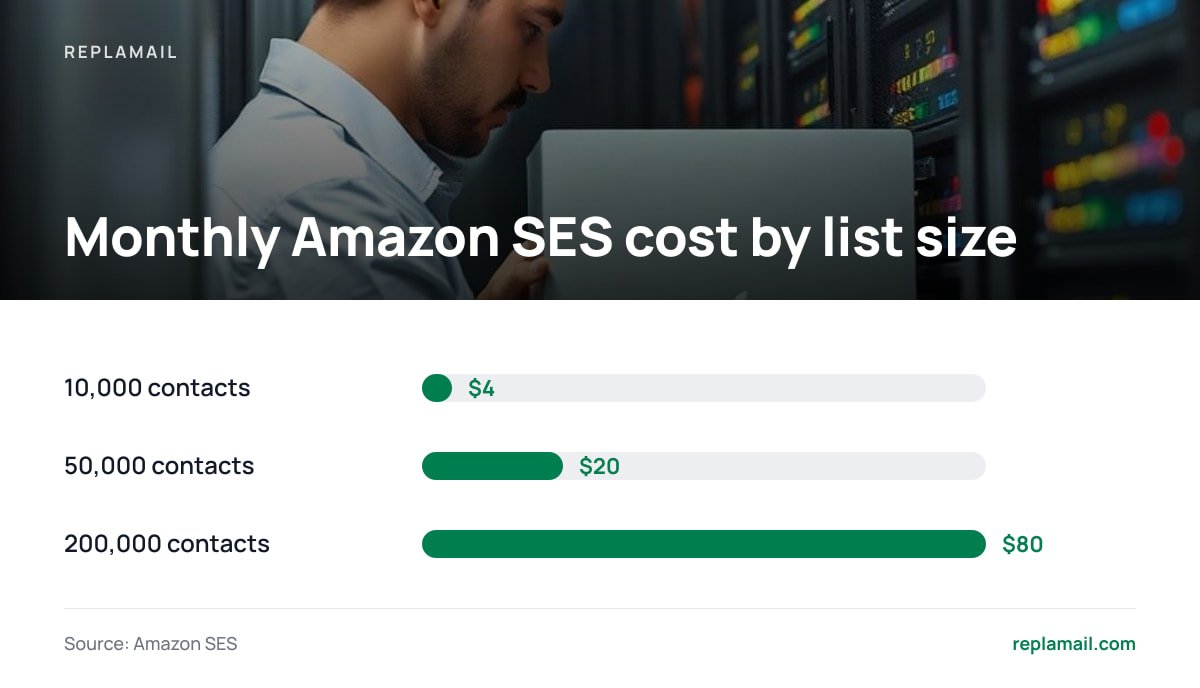
The sending fee depends on emails sent, not contacts stored. Inactive subscribers cost you nothing until you mail them. Here is what that looks like at four sends a month:
| Contacts | Emails per month (4 sends) | SES at $0.10/1,000 | SES at $0.16/1,000 | Server |
|---|---|---|---|---|
| 10,000 | 40,000 | $4 | $6.40 | €5–15 |
| 50,000 | 200,000 | $20 | $32 | €5–15 |
| 200,000 | 800,000 | $80 | $128 | €10–15 |
200,000 emails through Amazon SES costs $20 at $0.10 per 1,000. That covers 50,000 contacts mailed every week for a month.
Compare that with your current invoice. Hosted platforms typically price by contact count in tiers. Every new signup pushes you towards the next tier, even if half the list never opens anything. If you have been trimming your list to dodge an upgrade, our guide to growing your list without the per-contact tax covers the alternative.
Deliverability Is Your Job Now: SPF, DKIM, DMARC and One-Click Unsubscribe
On a hosted platform, the vendor sets up most of the authentication plumbing. When you self-host, you add the DNS records yourself. The good news is that it is a one-time job of maybe an hour per domain.
- SPF. This DNS record lists which services may send mail for your domain. You add your sending service to it.
- DKIM. This is a cryptographic signature on each message. Your sending service generates the keys, and you publish them in DNS.
- DMARC. This policy tells receiving servers what to do when SPF or DKIM fails, and sends you reports. DMARC.org publishes the specification and setup resources.
- One-click unsubscribe. This is a List-Unsubscribe header that lets mailbox providers show an unsubscribe button. The mechanism is defined in IETF RFC 8058.
These records are now required, not just recommended. Google's email sender guidelines define a bulk sender as anyone sending close to 5,000 or more messages a day to personal Gmail accounts. Bulk senders must authenticate with SPF, DKIM and DMARC, support one-click unsubscribe and keep their spam complaint rate low.
Google tells bulk senders to keep spam rates below 0.1% and never reach 0.3%. At 0.3%, that is three complaints per 1,000 emails delivered.
Pro Tip: Send marketing email from a subdomain such as news.yourbrand.com rather than your main domain. Reputation is tracked partly per domain. A campaign that draws complaints then hurts the subdomain, not the domain your invoices, password resets and staff email depend on. Set up SPF, DKIM and DMARC on the subdomain separately. Do it before your first send, not after your first problem.
Consent, Bounces and Complaints: The Compliance Work That Moves In-House
When the software runs on your server, the personal data sits in your database. If you send to people in the EU or UK, that makes you the data controller in a very literal sense. Under Article 7(1) of the GDPR, you must be able to demonstrate that a person consented when consent is your lawful basis. "They filled in a form once" is not a record. A timestamp, the form they used and a confirmation click are.
That is why double opt-in is worth switching on even where the law does not strictly demand it. The subscriber confirms by clicking a link. You keep a dated record. Typo addresses never make it onto the list, so they never inflate your bounce rate.
- Hard bounces. These are addresses that do not exist. Suppress them after the first bounce, permanently. A platform that keeps mailing them damages your reputation with every send.
- Complaints. These happen when someone marks your email as spam. Your sending service reports it back, and your platform must unsubscribe that person automatically. Amazon SES monitors account-level bounce and complaint rates. It can place an account under review or pause sending if those rates climb.
- Unsubscribes. These must be honoured promptly and must suppress the contact across every list on that brand, not just the one they clicked from.
Check that any self-hosted tool you consider does all three automatically. Doing them by hand works for a month and then falls apart.
What You Give Up, and Who Should Stay on a Hosted Tool
Self-hosting is not free of trade-offs, and anyone telling you otherwise is selling something. Here is what you take on or lose:
- Backups. Your list is your asset. If the server dies and you have no backup, the list goes with it. Use your server provider's snapshots or a nightly database dump to separate storage, and test a restore.
- Updates and security. You patch the operating system and apply application updates. A neglected server facing the internet is a liability.
- Integrations. Hosted platforms often ship with native connectors for ecommerce stores, CRMs and SMS. Many self-hosted tools do not, so you either build the connection or go without.
- Testing features. Built-in A/B testing, RSS-to-email and predictive send times vary widely between self-hosted products. Check the feature list against how you actually work.
Our position: if your list is under a couple of thousand contacts, you send once a month, and nobody on the team will touch a server, stay where you are for now. The saving is too small to justify the work. Once you pass roughly 10,000 contacts, run more than one brand, or start rationing signups to stay under a pricing tier, the maths changes quickly. Self-hosting then wins.
Before you choose a tool, decide which automation you actually need. Our breakdown of automated email marketing triggers and rules helps you list the welcome sequences, re-engagement flows and branching logic you rely on. You can then check each one is supported.
Running Several Brands Without Several Bills

Agencies feel per-contact pricing hardest. Each client usually means a separate account, a separate subscription and a separate contact count. The same person subscribed to two clients' lists is billed twice.
A self-hosted platform that supports multiple brands from one install changes that. Each brand gets its own sending domain, its own lists, its own templates, its own signup forms and landing pages, and its own suppression list. They all share one server and one licence. Sending costs stay per email, so a quiet client costs almost nothing in a month when they do not send.
Three things to check before you consolidate clients onto one install:
- Separate sending identities. Each brand should authenticate its own domain. One client's complaint spike must not affect another client's deliverability.
- Team roles. Client staff should see only their own brand. Your team should see everything.
- Separate signup assets. Each brand needs its own forms and landing pages on its own domain. Our guide to choosing a landing page builder that feeds your list covers what to look for.
Cut the Per-Contact Bill to a Server and a Sending Fee
ReplaMail is self-hosted email marketing software built for exactly the setup described above. It costs $299 once for one company, or $899 for the Agency licence. It runs on a small €5–15 server and sends through your own Amazon SES, SMTP2GO, Resend, Postmark, Mailgun, SendGrid or SMTP account. You get unlimited brands, contacts and sends. It includes a drag-and-drop designer, branching automations, signup forms, landing pages, double opt-in, automatic bounce and complaint handling, and team roles. The first 12 months of updates are included, then updates are optional at $49 a year. It is a commercial licence that includes the source code. It is not open source.
The honest limit: ReplaMail does not include backups, A/B testing, RSS-to-email, SMS, social posting, a CRM, or Shopify and WooCommerce integrations. Read the feature list before you migrate, and plan your own backup routine from day one.
Frequently Asked Questions
Do I need to run my own mail server to use a self-hosted email marketing platform?
No, and for marketing volume you should not. The platform runs on your server, but the email is delivered through a sending service such as Amazon SES or another SMTP relay. These services already have warmed infrastructure and the reputation that mailbox providers trust.
How much does self-hosted email marketing cost per month?
Expect a small server at about €5–15 a month plus sending fees. Amazon SES charges $0.10 per 1,000 emails at its standard rate, and new accounts start at $0.16 per 1,000. Mailing 50,000 contacts four times a month is 200,000 emails, about $20 at the standard rate, on top of a one-off software licence.
Is self-hosted email marketing worse for deliverability?
Not if you use a reputable sending service and set up SPF, DKIM and DMARC correctly. Deliverability depends far more on authentication, list hygiene and complaint rates than on where the campaign software runs. Google requires bulk senders to keep spam complaint rates below 0.3%.
Is self-hosted email marketing GDPR compliant?
It can be, but compliance becomes your responsibility because the subscriber data sits on your server. GDPR Article 7(1) requires you to be able to demonstrate consent, so record when and how each person signed up. Double opt-in gives you a dated confirmation record for every subscriber.
When is a hosted email platform still the better choice?
For very small lists, infrequent sends, or teams that rely on built-in ecommerce, CRM or SMS integrations, a hosted platform may be simpler. The cost advantage of self-hosting grows with list size and with the number of brands you manage. Below a few thousand contacts, the saving rarely justifies running a server.
Sources
- Amazon SES Pricing | Amazon Web Services
- Email sender guidelines | Google
- RFC 8058: Signaling One-Click Functionality for List Email Headers | IETF
- Domain-based Message Authentication, Reporting and Conformance | DMARC.org
- Regulation (EU) 2016/679 (General Data Protection Regulation) | EUR-Lex