
Email marketing and marketing automation overlap, but they are not the same thing. Email marketing is the messages you send to a list. Marketing automation is the set of rules that decides when each person gets which message, without you pressing send. For most small businesses, automation simply means email triggered by behaviour, such as a signup, a purchase or a click. The difference matters for your budget: many platforms gate automation behind higher tiers and charge per contact, so the feature that saves you time also raises your bill.
TL;DR:
- Email marketing is what you send. Marketing automation is the logic that decides who gets it and when.
- For most small businesses, three automations do most of the work: a welcome sequence, a post-purchase follow-up and a re-engagement flow.
- Since 2024, Google and Yahoo require bulk senders to authenticate their mail, offer one-click unsubscribe and keep spam complaints below 0.3%. This applies to automated mail too.
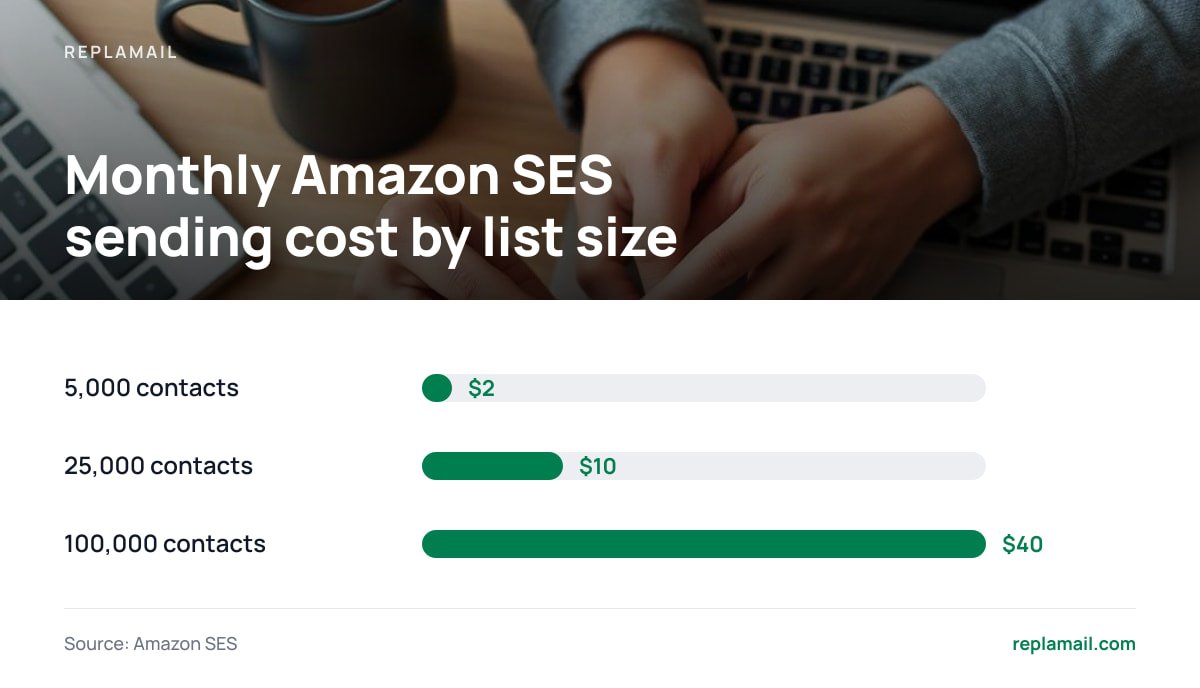
- Sending 400,000 emails a month through Amazon SES costs about $40 at its published $0.10 per 1,000 rate. Per-contact pricing is where the real money goes.
- Self-hosting makes sense once your list or brand count makes per-contact tiers painful. It is the wrong choice if nobody on your team can look after a server.
Table of Contents
- Email Marketing and Marketing Automation: Where One Ends and the Other Starts
- The Automations Worth Building First, and the Ones to Skip
- How Triggers, Conditions and Branches Fit Together
- Deliverability Rules Your Automated Emails Must Follow
- What Email Marketing Automation Really Costs: Sending vs Software
- Consent and Compliance Before You Automate Anything
- Which Setup We Would Pick, and When Not to Self-Host
- Run Branching Automations for Every Brand Without a Per-Contact Bill
- Frequently Asked Questions
- Sources
Email Marketing and Marketing Automation: Where One Ends and the Other Starts
Email marketing is the work of building a list and sending it messages. These include newsletters, launch announcements, sales and product updates. You decide what goes out and when, and everyone on the list (or a segment of it) gets the same message at the same moment. The industry calls these broadcasts or campaigns.
Marketing automation is the layer that sends messages for you, based on what a contact does or doesn't do. Someone joins your list and gets a welcome email ten minutes later. Someone buys and gets a setup guide three days later. Someone stops opening for 90 days and gets a "still want these?" email before you remove them. Each message is written once and then runs every time the trigger fires.
The confusion comes from vendors. "Marketing automation" sounds like a separate product category, and it is sold as one: lead scoring, CRM sync, multi-channel journeys. For a business with one to ten brands and a few thousand to a few hundred thousand contacts, though, it is mostly email on a timer with a few if/else branches. We cover the line between the two in more depth in Email Marketing and Automation: The Real Difference. The short version: you need both, and you should not pay enterprise prices for the second.
The Automations Worth Building First, and the Ones to Skip
Start with the flows that earn their keep on day one. Every automation you build is one you must maintain, test and keep compliant. Five well-built flows beat twenty half-finished ones.
Welcome sequence
Highest return, lowest effort. A new subscriber is never more interested than in the first hour after signing up. Send two to four emails over the first week. Deliver whatever you promised on the signup form, explain what they will get from you and how often, and make one clear offer.
Double opt-in confirmation
A gatekeeper as much as an automation. A confirmation email that the subscriber must click keeps typos, bots and spam traps off your list. Your list grows more slowly. In return, the contacts you keep are real, and that protects your sending reputation.
Post-purchase follow-up
Turns buyers into repeat buyers. A thank-you, a how-to-use guide, and then a review or referral request a week or two later. If your shop platform doesn't connect directly to your email tool, you can still trigger this from a tag or a list added by webhook or import.
Re-engagement and sunset
Protects deliverability. Contacts who haven't opened or clicked in 90 to 180 days drag down your engagement signals. Send them one or two "do you still want these?" emails. Then stop mailing anyone who doesn't respond. Removing dead weight is the cheapest deliverability fix there is.
Abandoned signup or lead-magnet nudge
Optional, but useful. If someone downloads a guide but never opens the follow-ups, one reminder is reasonable. Three is nagging.
What to skip at first: elaborate lead scoring, 15-step nurture tracks and flows with more than two or three branches. Lead scoring needs enough volume and a sales team to act on the scores. Long nurture tracks and heavy branching are hard to debug, and you can't easily see whether they work. Build them once the simple flows are proven. For a deeper walkthrough of triggers and rules, see Automated Email Marketing: Triggers, Rules and the Real Cost.
How Triggers, Conditions and Branches Fit Together
Every automation, in any tool, is built from the same three parts. If you understand these, you can rebuild your flows on any platform without starting from scratch.
- Triggers. The event that starts the flow. Common triggers are joining a list, submitting a specific form, getting a tag, clicking a link or reaching a date. Each flow should have exactly one trigger. Flows with several triggers are where duplicate sends come from.
- Waits. Delays between steps, such as "wait 2 days" or "wait until Tuesday 9am". Delays that are too short feel like spam. Delays that are too long mean the contact has forgotten you.
- Conditions and branches. If/else checks, such as "did they open email 1?", "are they tagged customer?" or "did they click the pricing link?". Each branch splits the contact down a different path.
- Actions. Send an email, add or remove a tag, move to a list, or exit the flow.
The most common mistake is forgetting exit conditions. A contact who buys halfway through your "please buy" sequence should leave it immediately. Without an exit rule, they get two more sales emails for something they already own. That is how you earn unsubscribes and complaints from your best customers.
Pro Tip: Add an exit-on-purchase or exit-on-tag check before every send step, not just at the start of the flow. Contacts change state while they sit in a wait step. A check at the start of the flow only catches people who had already converted before they entered it.
Deliverability Rules Your Automated Emails Must Follow
Automated email is still bulk email in the eyes of mailbox providers, and the rules tightened sharply in 2024. Google's email sender guidelines say that anyone sending more than 5,000 messages a day to Gmail addresses must set up SPF, DKIM and DMARC for their sending domain. They must also include one-click unsubscribe in marketing messages and process unsubscribe requests within two days. Yahoo's sender best practices set out matching requirements for Yahoo mailboxes.
One-click unsubscribe is a specific technical standard, not just a link in the footer. It is defined in RFC 8058, published by the Internet Engineering Task Force. It uses a List-Unsubscribe-Post header so the inbox itself can show an unsubscribe button. Whatever tool you use, confirm it adds this header to marketing sends, automated ones included.
0.3%. That is the spam-complaint rate Google tells senders never to reach, and it recommends staying below 0.1%.
Automations break this rule more often than campaigns do, because nobody watches them. A welcome flow that fires on a scraped or bought list will generate complaints every day until someone notices. Use double opt-in on every signup form that feeds an automation, check your complaint rate in Google Postmaster Tools every week, and pause any flow whose complaint rate climbs.
What Email Marketing Automation Really Costs: Sending vs Software

The cost of sending email has collapsed. The cost of the software to manage it has not. These are two separate bills, and most per-contact platforms bundle them together so you cannot see which is which.
Sending is cheap. Amazon SES pricing lists outbound email at $0.10 per 1,000 messages on its à la carte rate. If your SES account is new, budget for around $0.16 per 1,000 at first. Either way, the infrastructure cost of the email itself is a rounding error.
| Contacts | Emails per contact per month | Emails sent | SES cost at $0.10/1,000 | SES cost at $0.16/1,000 | Small server |
|---|---|---|---|---|---|
| 5,000 | 4 | 20,000 | $2 | $3.20 | ~€5–15/month |
| 25,000 | 4 | 100,000 | $10 | $16 | ~€5–15/month |
| 100,000 | 4 | 400,000 | $40 | $64 | ~€5–15/month |
400,000 emails a month through Amazon SES costs $40 at the published rate. Most of what a per-contact plan charges you is not for sending.
Per-contact platforms price on list size, and the price rises in tiers as your list grows. Many also keep branching automation, multiple audiences or extra brands for their higher plans. Before you compare, take a screenshot of your current platform's pricing page and note the date. Tier prices change, and you will want proof of what you were quoted. Then add up your real monthly cost across every brand and list you manage. Agencies running five or ten client lists often find this total is the largest software line in their budget.
The trade-off is real. Hosted platforms handle uptime, updates, backups and deliverability monitoring for you. With self-hosting, those jobs become yours. We break down the maths for growing lists in Email Automation Software: Stop Paying More as Your List Grows.
Consent and Compliance Before You Automate Anything

Automation multiplies whatever you put into it, including compliance mistakes. Get consent and unsubscribe handling right before you build a single flow.
- Record consent. Store when, where and how each contact signed up. Double opt-in gives you a timestamped confirmation click, which is the strongest evidence you can have.
- Honour opt-outs fast. The FTC's CAN-SPAM compliance guide says US senders must honour opt-out requests within 10 business days. It also requires a valid physical postal address in every message and bans deceptive subject lines. Google and Yahoo's two-day expectation for bulk senders is stricter, so in practice, design for that.
- Know which law applies. Subscribers in the UK and EU are covered by GDPR and national e-privacy rules, which generally require opt-in consent before you send marketing email. The rule that applies is set by where your subscribers are, not where your server is.
- Handle bounces and complaints automatically. Hard bounces and spam complaints should suppress a contact immediately, across every list and every brand. Manual clean-up does not keep pace with an automation that runs around the clock.
A clean, consented list is also the foundation of everything else in this article. See Email List Building: Grow Your List Without the Per-Contact Tax for how to build one.
Which Setup We Would Pick, and When Not to Self-Host
Stay on a hosted platform if your list is under a few thousand contacts, you run one brand, and nobody on your team is comfortable with a server, DNS records and an SES console. The monthly fee buys you peace of mind, and at that size the per-contact premium is small.
Move to self-hosted if you manage several brands or client lists, your list is in the tens of thousands, or you are paying extra just to unlock automation branching. At that point you are paying a recurring premium for software features, not for sending. A one-off licence on a €10 server, with mail sent through your own SES or SMTP account, pays for itself quickly.
Use both if you need features a self-hosted tool doesn't have. Shop-platform integrations, built-in A/B testing and SMS are the usual examples. Some businesses keep transactional or e-commerce flows on a specialist tool and move newsletters and lead-nurture automations to a self-hosted install.
Our position: for agencies and multi-brand businesses, per-contact pricing is the wrong model for software that costs almost nothing to run per message. Own the software, rent the sending, and keep the difference.
Run Branching Automations for Every Brand Without a Per-Contact Bill
ReplaMail is self-hosted email marketing software you buy once: $299 for one company, or $899 for the Agency licence. It includes a drag-and-drop campaign builder, branching automations, signup forms, landing pages, double opt-in, bounce and complaint handling, and team roles. Brands, contacts and sends are unlimited, all from one install. Your mail goes out through your own Amazon SES, SMTP2GO, Resend, SendGrid, Mailgun, Postmark or SMTP account, so at SES rates you pay cents per thousand emails and nothing per contact. Updates are included for 12 months. After that, they are optional at $49 a year.
The honest limits: ReplaMail is not a sending service, and it needs a small server costing about €5–15 a month. It has no SMS, social posting, Shopify or WooCommerce integration, A/B testing, RSS-to-email or CRM, and it doesn't make backups for you. If any of those are essential to you, check the feature list against your needs before you buy.
Frequently Asked Questions
Is marketing automation the same as email automation?
For most small businesses, it effectively is. Marketing automation can include SMS, ads and CRM workflows, but the part that delivers most of the value is email triggered by behaviour, such as signups, purchases and inactivity. Start with email automation, and add other channels only once those flows are proven.
What is the first automation I should build?
Build a welcome sequence of two to four emails over the first week after someone signs up. New subscribers are at their most engaged then, and the flow runs indefinitely once it is written. Pair it with double opt-in so the list feeding it stays clean.
How much does it cost to send automated emails yourself?
Amazon SES lists outbound email at $0.10 per 1,000 messages on its à la carte rate. New accounts should budget for around $0.16 per 1,000 at first. A list of 25,000 contacts receiving four emails a month comes to roughly $10 to $16 in sending costs, plus a small server.
Do automated emails need an unsubscribe link?
Yes. Automated marketing emails are subject to the same rules as campaigns. Google and Yahoo require bulk senders to support one-click unsubscribe using the RFC 8058 header and to process requests within two days. The US CAN-SPAM Act also requires a working opt-out in every commercial email.
Is self-hosted email marketing harder to keep out of spam folders?
Not if you send through a reputable provider such as Amazon SES and authenticate your domain with SPF, DKIM and DMARC. Deliverability depends mostly on authentication, list quality and complaint rates, not on where the software is hosted. The extra work with self-hosting is monitoring those signals yourself.
Sources
- Email sender guidelines | Google Workspace Admin Help
- Sender Best Practices | Yahoo Sender Hub
- RFC 8058: Signaling One-Click Functionality for List Email Headers | IETF / RFC Editor
- Amazon SES Pricing | Amazon Web Services
- CAN-SPAM Act: A Compliance Guide for Business | Federal Trade Commission