
Amazon SES pricing is $0.10 per 1,000 emails on the à la carte model listed by AWS, and new accounts start at $0.16 per 1,000. Either way, a single email costs a fraction of a cent. What matters more is that SES only delivers mail. It has no list manager, no editor, no signup forms and no automations. Your real bill is SES plus whatever software sits on top of it, and the software is usually the larger number.
TL;DR:
- SES charges $0.10 per 1,000 emails à la carte, and new accounts start at $0.16 per 1,000. That makes 100,000 sends cost $10 to $16.
- Attachments are billed at $0.12 per GB. A 1 MB PDF sent to 100,000 people adds about $12, which is more than the sends themselves.
- New accounts start in a sandbox: 200 messages per 24 hours, sent only to verified addresses, until AWS approves production access.
- AWS reviews accounts at a 5% bounce rate or 0.1% complaint rate, so list hygiene is a pricing issue as well as a deliverability one.
- SES is a delivery pipe, not a marketing tool. Budget for the campaign software and a small server, or the cheap per-email rate is misleading.
Table of Contents
- Amazon SES Pricing in 2026, Line by Line
- How Much Is SES Per Email, and What a Monthly Bill Looks Like
- The Free Tier: What Disappeared and What New Accounts Get
- How Amazon SES Works, From Sandbox to Production
- Hidden Line Items: Attachments, Dedicated IPs and Reputation Rules
- What SES Leaves Out, and What Hosting the Rest Costs
- When SES Is the Wrong Answer, and the Alternatives Worth Checking
- Run Your Campaigns on SES Rates Without a Per-Contact Bill
- Frequently Asked Questions
- Sources
Amazon SES Pricing in 2026, Line by Line
Amazon Simple Email Service bills on usage. There is no monthly minimum and no contract. The headline rate is $0.10 per 1,000 outbound emails, and new accounts start at $0.16 per 1,000. Several smaller line items sit underneath that rate, and most cost comparisons leave them out. All prices below were taken from the AWS pricing page at the time of writing. AWS can change them, so check the page before you commit to a budget.
| Charge | Price (at time of writing) | When it applies |
|---|---|---|
| Outbound email, à la carte | $0.10 per 1,000 | Every message sent |
| Outbound email, new accounts | $0.16 per 1,000 | Starting rate for newly created accounts |
| Attachments | $0.12 per GB | Data sent as attachments |
| Inbound email | $0.10 per 1,000, plus $0.09 per 1,000 incoming 256 KB chunks | Only if you receive mail through SES |
| Dedicated IP address | $24.95 per IP per month | Optional; shared IPs are free |
| Virtual Deliverability Manager | Extra fee per 1,000 emails | Optional insights add-on |
Most marketing senders only pay the first two rows. The others matter only if you attach files, receive mail through SES or lease your own IP. The gap between $0.10 and $0.16 is real: at the higher rate, the same volume costs 60% more. That gap is the main thing behind the "Amazon SES pricing increase" searches. The original per-message rate hardly moved for over a decade, so a new starting rate stands out.
How Much Is SES Per Email, and What a Monthly Bill Looks Like

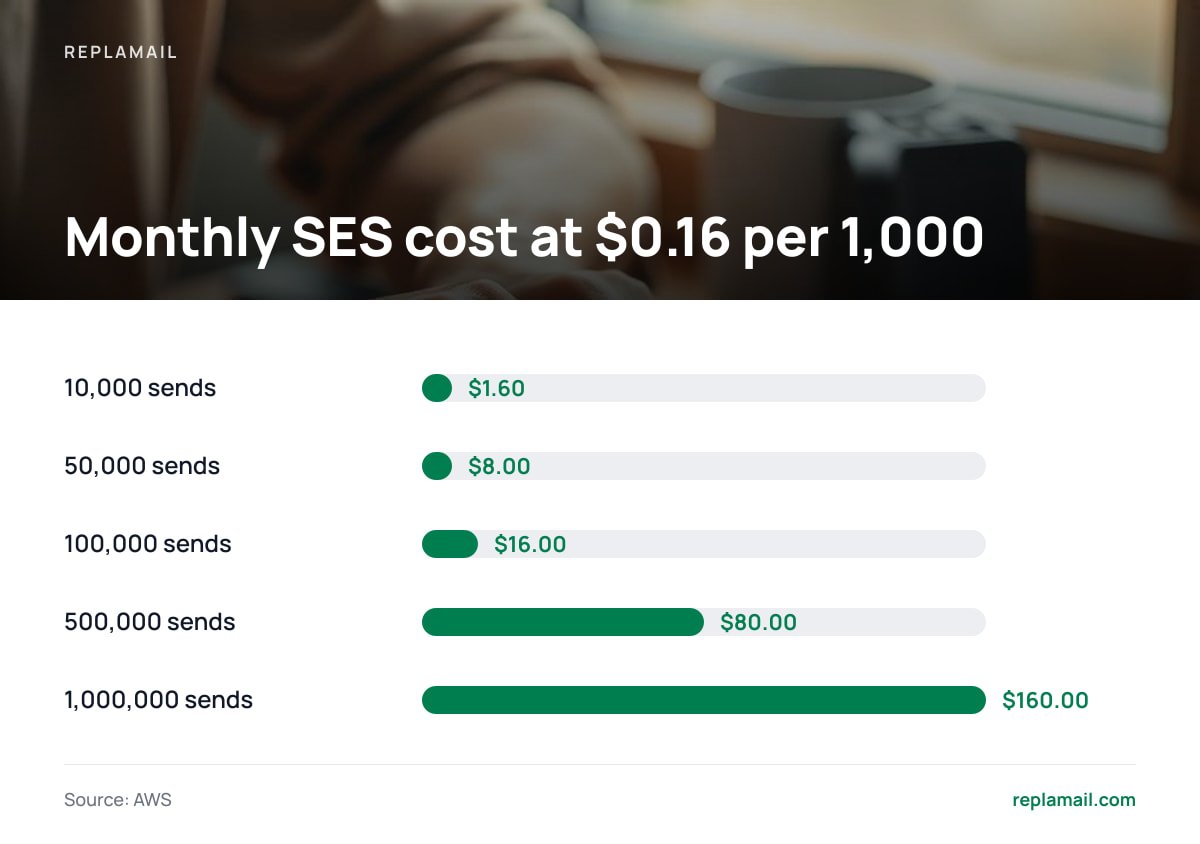
At $0.10 per 1,000, one email costs $0.0001, which is one hundredth of a cent. At $0.16 per 1,000 it costs $0.00016. Those numbers are too small to reason about, so convert your list size and sending frequency into monthly volume first.
| Monthly sends | Example | At $0.10 / 1,000 | At $0.16 / 1,000 |
|---|---|---|---|
| 10,000 | 2,500 contacts, weekly | $1.00 | $1.60 |
| 50,000 | 12,500 contacts, weekly | $5.00 | $8.00 |
| 100,000 | 25,000 contacts, weekly | $10.00 | $16.00 |
| 500,000 | 125,000 contacts, weekly | $50.00 | $80.00 |
| 1,000,000 | 250,000 contacts, weekly | $100.00 | $160.00 |
These figures cover sending only and assume no attachments. Note what the table shows: a business with 25,000 contacts that emails every week pays SES between $10 and $16 a month. If you pay a per-contact marketing platform for a list that size, compare that range with your last invoice. The difference is the software margin you are paying for.
If you want to model more complex set-ups, such as several regions, dedicated IPs or inbound mail, AWS's own Pricing Calculator includes SES. For a straightforward marketing sender, the table above gives the same answer: monthly sends divided by 1,000, multiplied by your rate.
The Free Tier: What Disappeared and What New Accounts Get
Many older guides still say SES gives you 62,000 free emails a month. That allowance applied to mail sent from an EC2 instance, and AWS ended it in August 2023. It was replaced with a smaller 12-month allowance for new accounts.
AWS then reworked its free tier for new accounts again in 2025. What your account gets therefore depends on when and how it was created. Open the Free Tier page in your billing console rather than relying on any blog post's figure, including this one.
The bigger point is that a free tier barely matters for SES. Even at the higher starting rate, 3,000 emails cost under 50 cents. Choose a sending provider on deliverability and tooling, not on a free allowance worth less than a coffee.
How Amazon SES Works, From Sandbox to Production

SES is an outbound mail relay. Your application or email software hands it a message through the SES API or over SMTP. SES signs the message, sends it from Amazon's IP addresses, and reports back what happened: delivered, bounced, or marked as spam by the recipient. It does not store your contact list, design your emails or decide who should receive what. Those jobs belong to whatever software you connect to it.
How to create an Amazon SES account
- Create or sign in to an AWS account. SES is a service inside AWS, not a separate signup. You will need a payment card.
- Pick a region. Your sending identities and quotas are set up per region, so choose one and use it consistently.
- Verify your sending domain. Add the DKIM records SES generates to your DNS. Add SPF and a DMARC policy at the same time.
- Test in the sandbox. New accounts can send only to verified addresses, up to 200 messages per 24 hours and one per second.
- Request production access. AWS's production access process asks how you collect addresses and how you handle bounces and complaints. Give specific answers. Vague requests are the ones that get declined.
Pro Tip: When you request production access, describe your double opt-in flow and say that bounces and complaints are suppressed automatically through SES event notifications. In the request form, a concrete process carries more weight than a large volume estimate. Ask for a modest starting quota as well. Quotas rise on their own as you build a sending history, and a small, credible request is easier to approve than an ambitious one.
Hidden Line Items: Attachments, Dedicated IPs and Reputation Rules
The per-email rate is so low that the side charges and policy rules end up deciding your real cost.
- Attachments. At $0.12 per GB, file size outweighs message count quickly. Link to files hosted elsewhere instead of attaching them.
- Dedicated IPs. At $24.95 a month, a dedicated IP costs more than sending 150,000 emails at the new-account rate. Below several hundred thousand steady monthly sends, you usually lack the volume to warm and maintain your own IP. Use the shared pool and spend the money elsewhere.
- Inline images. Images embedded in the message body add weight, just as attachments do. Host images on a web server or CDN and reference them by URL.
- Reputation enforcement. AWS monitors bounce and complaint rates. Its enforcement FAQ explains that accounts go under review at a 5% bounce rate or a 0.1% complaint rate, and sending can be paused at 10% or 0.5%.
A 1 MB PDF sent to 100,000 people is roughly 98 GB of attachment data, or about $12 at $0.12 per GB. That is more than the $10 it costs to send the emails.
Mailbox providers set their own rules on top of these. Google's email sender guidelines require bulk senders to authenticate with SPF, DKIM and DMARC, keep reported spam below 0.3%, and support one-click unsubscribe as defined in IETF RFC 8058. SES gives you the tools to authenticate. Your email software has to supply the unsubscribe header and act on the request.
0.1%. That is one complaint per 1,000 emails, and it is the point at which AWS starts reviewing your account.
What SES Leaves Out, and What Hosting the Rest Costs
SES is not an email marketing platform. To run campaigns on it, you still need:
- a contact database with segments and unsubscribe status;
- a campaign editor;
- signup forms with double opt-in;
- automations;
- bounce and complaint processing that removes bad addresses automatically.
You can build all of that yourself or buy software that does it.
If you self-host that software, you also need somewhere to run it. People who search "how much does Amazon hosting cost" in this context are usually asking that question. You do not need AWS for this part. A small virtual server from any reputable host costs about €5 to €15 a month, and that is enough to run campaign software sending through SES. AWS's own server products cost a similar amount for small instances, but their billing has more moving parts.
So a realistic monthly total for a 25,000-contact list emailed weekly is roughly $10 to $16 for SES plus €5 to €15 for the server. That is about $20 to $35 a month, before the cost of the software licence. For the full set-up and the trade-offs of running your own install, see our guide to self-hosted email marketing platforms. If you are deciding between subscription and ownership more broadly, pick the pricing model before the tool.
When SES Is the Wrong Answer, and the Alternatives Worth Checking

SES is the cheapest reputable delivery option at volume, and it is what we would pick for most marketing senders. It is not the right choice for everyone, though.
- You send under a few thousand emails a month. The savings are trivial, and the DNS, sandbox and production-access steps take real time. A sending service with a simple monthly plan may be less hassle.
- You need hands-on support. Standard SES comes with documentation, not an account manager. Paid AWS support plans exist but cost extra.
- Your list is old or bought. SES enforcement is strict. A list that bounces at 8% will get your account reviewed within days. Clean the list first, whichever provider you use.
- You want transactional and marketing mail strictly separated. You can do this on SES with configuration sets and separate subdomains, but some teams prefer a second provider for transactional mail.
Alternatives such as SendGrid, Mailgun, Postmark, Resend and SMTP2GO mostly price by monthly tier rather than per message. Compare their current pricing pages against your actual volume, not your hoped-for volume. Separately, decide what your campaigns should do automatically, because that affects the software you need far more than the delivery provider does. Our breakdown of email marketing vs marketing automation costs covers that split, and building automation workflows that know when to stop helps keep complaint rates under AWS's limits.
Run Your Campaigns on SES Rates Without a Per-Contact Bill
The cost problem in this article is simple. SES charges about $10 to deliver 100,000 emails, but most marketing platforms charge by list size. ReplaMail puts campaign software on your own server and sends through your own Amazon SES account, so delivery costs exactly what AWS charges you. It includes a drag-and-drop designer, branching automations, signup forms, landing pages, double opt-in, and automatic bounce and complaint handling, which keeps you under the thresholds above. You get unlimited brands, contacts and sends from one install.
It costs $299 once for one company, or $899 for the Agency licence. Both include 12 months of updates, then updates are an optional $49 a year. The honest limits: there are no A/B tests, no SMS and no built-in backups. You need a €5–15 server and must arrange your own backups. Check our spec sheet against your must-haves before you buy.
Frequently Asked Questions
How much does Amazon SES cost per month?
It depends entirely on volume. At $0.10 per 1,000 emails, 100,000 sends cost $10. At the $0.16 starting rate for new accounts, the same volume costs $16. There is no monthly minimum, but attachments, dedicated IPs and inbound mail are billed separately.
Is there still an Amazon SES free tier?
The old allowance of 62,000 free emails a month from EC2 ended in August 2023. AWS reworked its free tier for new accounts again in 2025, so the allowance depends on when your account was created. Check the Free Tier page in your AWS billing console for the exact figure.
Why is my Amazon SES account stuck in the sandbox?
Every new account starts in the sandbox, limited to 200 messages per 24 hours and to verified recipients only. To leave it, submit a production access request explaining how you collect addresses and handle bounces and complaints. Detailed, specific answers are approved more often than vague ones.
Do I need a dedicated IP with Amazon SES?
Usually not. A dedicated IP costs $24.95 a month at the time of writing and only pays off with high, steady volume that keeps it warm. Most senders below several hundred thousand monthly emails do better on the shared IP pool.
Can I use Amazon SES for newsletters and marketing emails?
Yes, provided your recipients opted in and you handle unsubscribes, bounces and complaints properly. SES only delivers the mail, so you need separate software for lists, campaigns, forms and automations.
Sources
- Amazon SES Pricing | Amazon Web Services
- Request production access (Moving out of the Amazon SES sandbox) | Amazon Web Services
- Amazon SES sending review process FAQs | Amazon Web Services
- Email sender guidelines | Google
- RFC 8058: Signaling One-Click Functionality for List Email Headers | IETF
- AWS Pricing Calculator | Amazon Web Services